




Part 1 of 2: How integrations and workflows run a business, where they stop today, and how AI that makes decisions helps them keep going.
Key Takeaways
- Automated Workflows Stop at Decision Steps: Traditional integrations move data smoothly across systems until they hit complex, unstructured judgment calls that require human intervention.
- Chat-Style AI Isn’t Built for Business Process Automation: Generative text models produce variable paragraph responses that software cannot act on directly, making them slow and costly for high-volume transactions.
- Decision-Making AI Enables End-to-End Automation: Decision models output structured, consistent data formats, allowing automated workflows to make routine choices faster, cheaper, and more reliably.
Most of the AI people use today writes. You ask a question, and it writes an answer. A new kind of AI does something different: it makes a decision and returns it in a form software can act on. Approve or hold. Billing or technical. Urgent or not.
That difference matters most in a place few people look: the integrations and automated workflows that run a business behind the scenes. These workflows move orders, invoices, and support tickets between systems all day. They run quickly until they reach a step that needs judgment. Then they stop and wait for a person.
AI that makes decisions lets people handle the routine cases and keep going.
This post explains how integrations and workflows work, where they stop today, and what changes when the decision step is automated. Part 2 shows how Boomi built it.
What an Integration Is
When a customer places an order online, a lot happens behind the scenes. The order is recorded in the accounting system. The warehouse is told what to ship. The customer gets a confirmation email. The sales team sees the purchase in their customer records. In most companies, software does much of this automatically, and nobody retypes the order.
Most companies run on many separate applications: One for accounting, one for sales, one for HR, one for customer support, and often dozens more. Each application keeps its own data in its own format.
An integration is a connection that moves data from one application to another, automatically. It also translates the data along the way, so that a customer record in one system lines up with the same customer in the next. Without integration, people copy information between systems by hand, which is slow and increases the risk of mistakes.
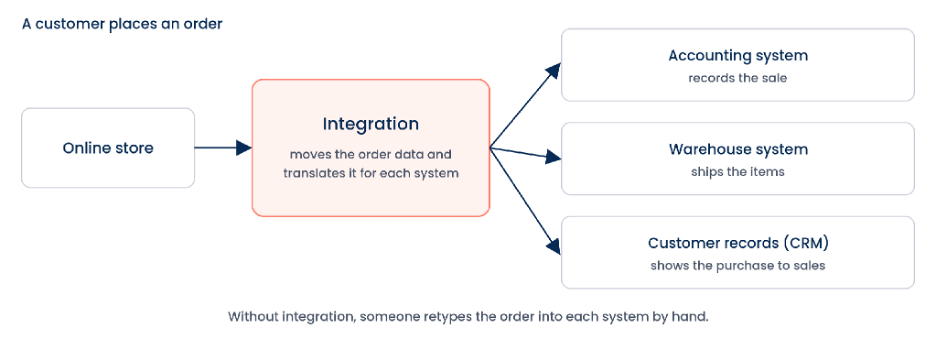
Figure 1. One order, sent automatically to every system that needs it
What a Workflow Is
A workflow is the series of steps it takes to finish a piece of business work, such as paying an invoice, setting up a new employee, or resolving a support ticket. Integrations move the data between the steps. Automation means software runs the steps instead of a person.
More than 30,000 organizations use the Boomi platform to build integrations and automate workflows like these.
Where Automation Stops: The Decision Step
Many workflows include a step where something has to be decided. Does this invoice match the purchase order? Is this support ticket about billing or a technical problem? Does this access request need a security review?
Today, software handles these steps with rules, such as “if the amount is over $10,000, send it for approval.” Rules work well when the information arrives in neat, labeled fields. They stop working when the information is in an email, a PDF, or a free-text note, or when a case comes up that nobody wrote a rule for. At that point the work goes to a person, and the workflow waits.
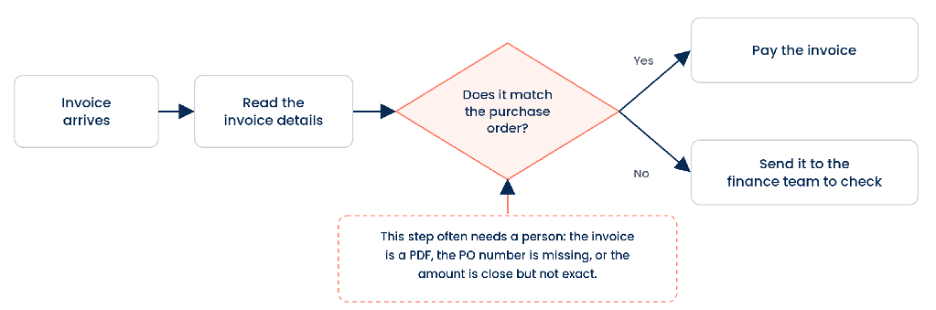
Figure 2. An invoice workflow with a decision step that often needs a person
One case waiting for a person is not a problem. Thousands a day are. Queues build up, customers wait, and skilled people spend their time on routine calls instead of the hard ones.
Why Chat-style AI Is a Poor Fit for This Step
Most people know AI through chat assistants: You ask a question and get a written answer. That works well for drafting, summarizing, and research. It works less well inside a workflow, for three reasons.
- Software can’t act on a paragraph. A workflow needs a specific answer in a specific place, such as “billing,” “yes,” or “high risk.” A written answer has to be converted into that form first, and the conversion can fail.
- The wording changes. Ask the same question twice, and you can get two differently worded answers, which makes the conversion unreliable.
- It is slow and expensive at volume. Writing a full answer takes time and computing power. That is fine for one person asking one question. It adds up when a workflow makes thousands of decisions a day.
A Different Kind of AI: Models Built to Decide
A newer kind of AI model is built for decision-making instead of writing. You give it the facts and a fixed set of questions, and it returns short answers in a set format: a category, a yes or no, a score. Software can act on those answers directly. One example is Jev, from TypeSafe AI, which Boomi uses in the product we describe in Part 2.
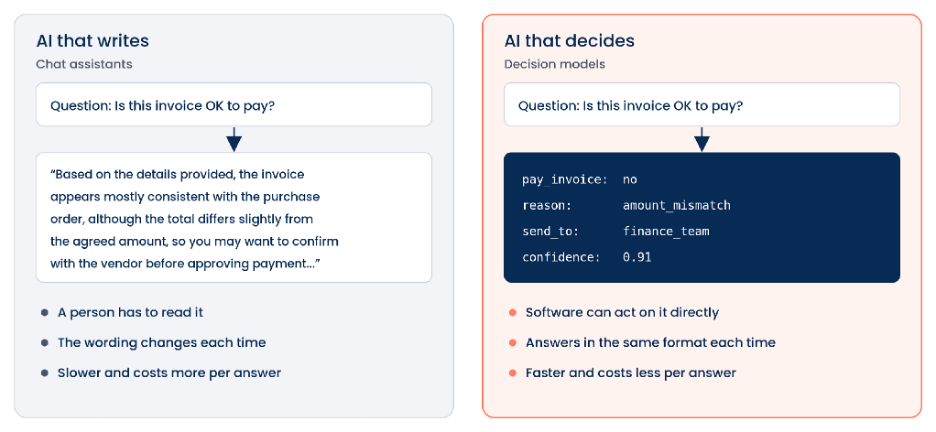
Figure 3. The same question, answered by AI that writes and by AI that decides (illustrative)
Because the model answers narrow questions instead of writing paragraphs, each decision is faster and costs less. That makes it practical to use AI on every transaction in a workflow, not only on a sample.
To be safe in a business workflow, the model also needs support around it. It needs a way to look up missing facts in other systems without being handed passwords. Its answers need to be checked against the expected format before anything acts on them. And it needs to say when it isn’t sure, so those cases go to a person.
What This Changes
With a decision model in the workflow, the decision step no longer has to wait for a person or depend on a rule that breaks on messy input. The workflow can read the email or the PDF, make the routine call, and keep going. People still handle the cases that need judgment, and they see fewer routine ones.
The same pattern applies across a business:
- Finance: Check each invoice against its purchase order before paying it.
- IT: Decide whether an access request can be approved or needs a security review.
- Customer service: Send each ticket to the right team and flag the urgent ones.
- Sales: Decide which new leads are worth a call this week.
- Insurance: Sort incoming claims by coverage and urgency.
In our companion blog, we show how Boomi built this into Boomi Agentstudio, how a decision agent works inside an integration, the controls around it, and a worked example from customer support.