




Part 2 of 2: How Decision Engine in Boomi Agentstudio puts a fast, validated decision inside an integration.
Key Takeaways
- Automate Judgment Calls in Integrations: Decision Engine in Boomi Agentstudio provides fast, validated AI judgments directly inside your integration workflows.
- Faster and Cost-Effective AI Decisions: Powered by TypeSafe AI’s Jev model, Decision Engine executes structured decision tasks 15x faster and at 30x lower cost than conversational LLMs.
- Enterprise-Grade Control and Reliability: Ensures data security and accuracy through schema-validated outputs, platform-managed credentials, bounded tool use, and confidence scoring for human review.
In Part 1, we explained integrations, workflows, and why the decision step is where automation often stops. This post shows how Boomi handles that step.
Many integrations and automations reach a point where someone has to decide something. Is this invoice safe to post? Does this access request need a security review? Which team should get this customer ticket?
Today, many teams handle that step in one of two ways. They write rules, which work until the input is an email, a scanned document, or a case nobody wrote a rule for. Those cases go to a person, and the flow waits. Others send the text to a language model and then parse the paragraph it returns into something a system can use. Both slow the process down, and neither gives the integration an answer it can rely on.
Decision Engine is a new agent mode in Boomi Agentstudio‘s Agent Designer, powered by TypeSafe AI’s Jev model. You define the decision as an output schema: for example, a disposition, a risk level, and a routing field. The agent reads the input, looks up anything else it needs from another system, and returns a validated decision. The integration then posts the invoice, holds it for review, or routes the ticket, based on those fields.
“Most automations stop at the first judgment call. Decision Engine lets the flow keep going with a decision it can check.” — Mani Gill, SVP of Product Management, Boomi
Two Kinds of Decisions
Some decisions are either/or: a case goes to a person, or it does not. Support triage is a common example. Today, someone reads each ticket, decides where it goes, and enters the result by hand. With Decision Engine, the ticket is routed in the same step that receives it. The gain is the time a customer waits for help, not only the staff hours.
Other decisions are incremental. The process already works, but it succeeds less often than it should. Delivery routing is an example. Suppose 92% of orders are routed correctly today. Each point of improvement means fewer failed deliveries, fewer re-dispatches, and fewer refunds. Small gains add up when a workflow makes thousands of decisions a day.
Three Ways to Handle a Decision Step
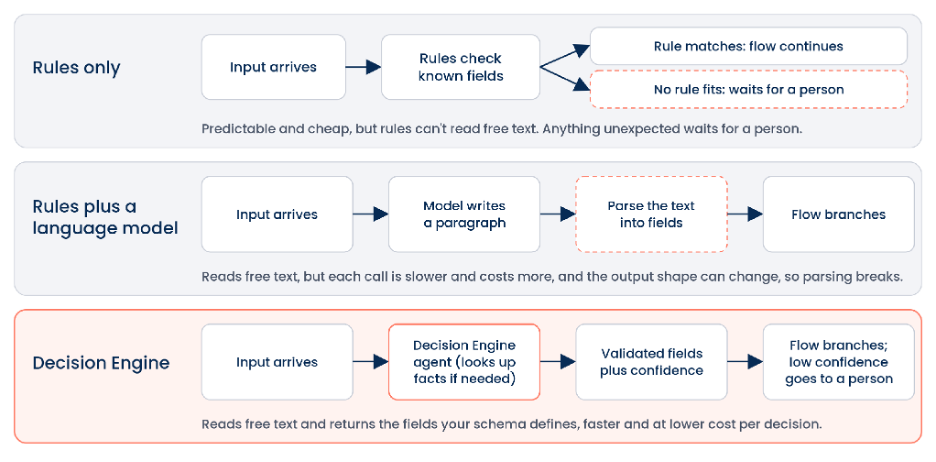
Figure 1. Rules, rules plus a language model, and Decision Engine
Rules are predictable and cheap, and they remain the right choice for fixed logic. But they can’t read an email or a scanned invoice, and they fail on cases nobody anticipated. Those cases go to a person.
Adding a general language model solves the reading problem but creates others. Its answer comes back as text that has to be parsed. Its output shape can change from run to run, so the parsing step breaks. And a conversational reasoning pass takes longer and costs more per decision than a model built for bounded tasks.
Decision Engine reads the same free text and returns the fields your schema defines, checked before the integration receives them. In our benchmark on structured decision tasks, Jev returned decisions 15 times faster, at 30 times lower cost per decision, than conversational reasoning.[1] At that speed and cost, you can apply a decision to every transaction, not only a sample. It works alongside rules: keep rules for fixed logic, and use Decision Engine where a judgment is needed.
How It Works
The model makes the judgment. Agentstudio runs the steps around it, shown in Figure 2.
Agentstudio turns your output schema into specific questions for the model, so you don’t write model-specific prompts or map answers back by hand. When the decision needs more context, it calls a lookup tool, such as your ERP or CRM, and passes the result back to the model. When a field needs a value such as an account ID, it selects that value from the input or a tool result instead of inventing one. It checks the final answer against the schema before the integration receives it.
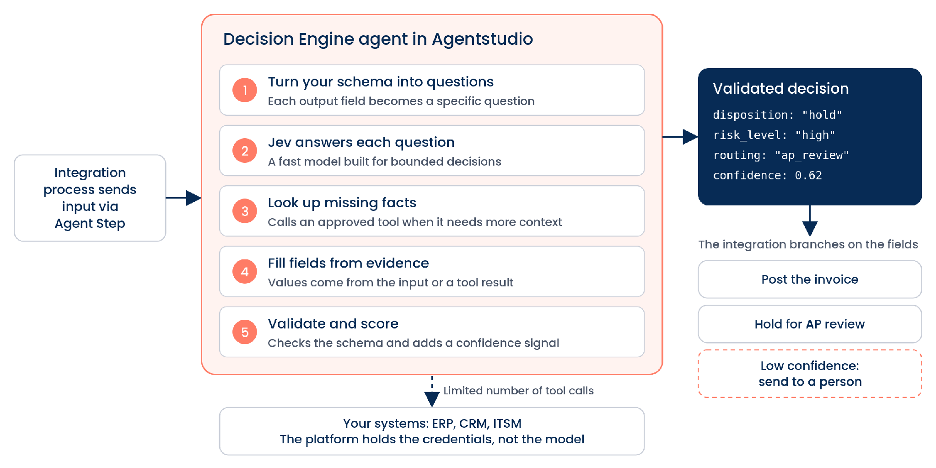
Figure 2. What a Decision Engine agent does between the input and the decision (illustrative invoice example)
Enterprise teams will want three controls, and Decision Engine has them:
- Credentials stay with the platform. The model never holds tool credentials.
- Tool use is bounded. Tool calls run through the platform’s existing execution path, with a limit on how many calls one decision can make.
- Uncertain cases go to a person. Each decision includes a confidence signal, so the integration can send low-confidence cases for review.
An Example: Support Triage
A customer writes that they have been overcharged for three months and will dispute the charges if the issue isn’t fixed today. The integration passes the message to an Agent Step, and the Decision Engine agent returns the fields in Figure 3.
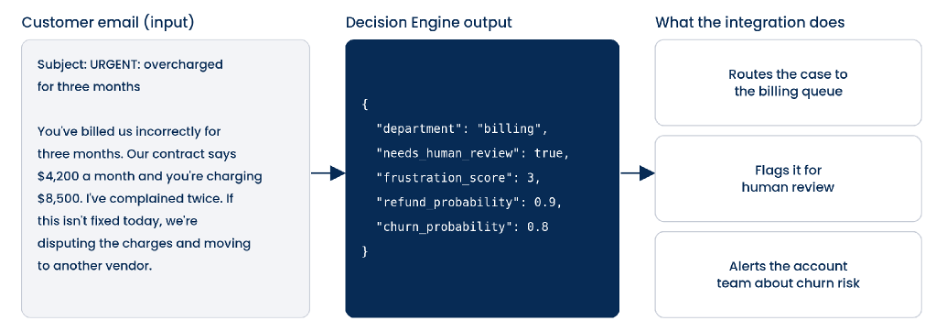
Figure 3. One support email, one structured decision, three actions (illustrative output)
The integration sends the case to the billing team, flags it for review, and alerts the account team about the churn risk. Nobody has to read the email to decide where it goes.
Get Started
In Agent Designer, choose Decision Engine as the agent mode. Define the input and output schemas, describe the decision, add a lookup tool if the decision needs one, and test the agent. Then deploy it and call it from an Agent Step in Boomi Integration. Decision Engine is available for Agents in Cloud and Agents in Runtime deployments.
Decision Engine brings judgment into the flow. Start with one decision your team makes every day, and see what changes when the answer arrives in the same step as the data.
To learn more, visit help.boomi.com and watch our short demo on Boomi Agentstudio’s Decision Engine mode, powered by Jev.