




The July 2026 release continues our momentum in helping you connect, automate, and activate AI across your enterprise. For a full list of what’s included in the release, see the detailed release notes.
Let’s take a look at the highlights in this release.
Disclaimer: This video was created using artificial intelligence (AI) tools.
Boomi Companion
Introducing Boomi Companion
Boomi Companion is an open source suite of Agent Skills that lets you work with the Boomi Enterprise Platform using natural language. Pick your LLM agent (Claude, Gemini, Copilot, or others), and Companion works with it. Companion translates plain-language requests into real work on your Boomi account, so you can build, deploy, and optimize processes. Learn more here.
Key capabilities include:
- bc-integration — Manage your integration processes, build components, handle deployments, and query your Boomi environment through natural conversation.
- bc-marketplace — Discover and leverage pre-built integrations and components from the Boomi marketplace to accelerate your projects.
Stay tuned as we add new skills to expand what’s possible.
Knowledge Hub
Introducing Boomi Knowledge Hub
Boomi Knowledge Hub, now available in Early Access, gives AI agents the trusted context they need to deliver accurate answers — no infrastructure to build or manage.
Connect any source — apps, documents, databases, webhooks — and Knowledge Hub handles the rest: ingestion, chunking, embedding, vector storage, and retrieval. One service, end-to-end. No point tools to stitch together, no custom infrastructure to own.
From thousands of files to large structured datasets, Knowledge Hub turns enterprise data into AI-ready knowledge at scale.
Knowledge Hub capabilities included in Early Access:
- No-Code RAG Pipeline Builder: Bring structured and unstructured data from any source into one unified Knowledge Base through Boomi Data Integration, fully managed from end to end.
- Native Agentstudio Integration: Agents built in Agentstudio search the Knowledge Base directly as a retrieval tool, so the data you ingest is seamlessly ready for them at runtime.
- Governed Context Layer: Every source feeds one governed layer with built-in access controls, policies, and monitoring, so every agent and user works from the same trusted, up-to-date data.
For Early Access to the Knowledge Hub, sign up here.
Boomi AI
This release deepens how agents connect to enterprise knowledge and reason over it — attaching business glossaries and governed knowledge bases for grounded, accurate responses, streaming agent reasoning in real time, and retaining data across a conversation session.
What’s New:
- Agent Garden/Designer
- Agentstudio APIs are publicly available. Boomi Agent Garden REST APIs let you create, configure, package, deploy, and execute AgentStudio agents programmatically, with no UI required. Because an agent’s config is just a JSON file, you can version and review it in your own Git repo, roll out through your existing CI/CD pipeline, and programmatically spin up one proven agent across business units, regions, or customers instead of rebuilding each by hand.
- Attach Meta Hub business glossaries to agent tasks at design time, giving agents your organization’s definitions, acronyms, and entity relationships. The result is more consistent, standards-aligned responses across every agent.
- Agent Designer now integrates with Knowledge Hub, letting agents securely retrieve governed enterprise knowledge to ground their responses. This reduces hallucinations and simplifies building knowledge-aware agents.
- With Extended Thinking enabled, the conversational interface streams an agent’s execution plan in real time, so you can follow its reasoning as it develops instead of waiting on a static “Thinking…” message. This works in both test and production.
- Agents now retain and recall data from earlier tool responses across a session, even after it has left the active context window. This cuts redundant tool calls and enables longer, data-rich conversations within token limits.
- Agent Garden agents can now accept files as input alongside or instead of a text message, so you can send documents and images directly at runtime to extract invoice data, analyze a scanned form, or pass a spec as context. File input is available through the Agent Garden Execute API, the Chat UI, and Agent Step for structured agents, and file contents are never cached or stored in the agent’s state.
- Agent Control Tower
- Monitor Knowledge Hub and Meta Hub usage directly in Control Tower, with per-source metrics showing how each knowledge base and glossary is used. Drill into session logs to see exactly how an agent used that context and debug responses faster when something looks off.
- Anomaly detection now extends beyond Boomi agents to Amazon Bedrock and custom provider agents, giving you one unified view of unusual behavior in invocation volume, latency, and token usage across every agent you run. Provider-based filtering lets you isolate issues by vendor, and agent identification in the anomaly table enables you to quickly obtain actionable insights on any specific agent.
- Orchestrate
- The new Solution View is a layer-based visualization that appears as the default landing page after AI generates a solution. A layer is a reusable automation blueprint that maps a business capability to the Boomi products that implement it. You can then switch to the Asset View to inspect and interact with the underlying Boomi products in the solution.
Data Integration
New Connectors
New connectors land in this release, connecting Boomi Data Hub, SharePoint, and OneLake directly to your pipelines and start extracting your data in minutes.
What’s New
- Data Hub Integration — Data Hub as a Source: Pull golden records out of Boomi Data Hub and land them in any warehouse natively. Setup is automated — no manual table structures, no loading config. Supports full load, incremental, and CDC mode, so you can run scheduled syncs or capture changes as they happen in your master data.
- Microsoft SharePoint as a Source: Connect SharePoint as a native source and load files directly into your warehouse or data lake (Snowflake, Databricks, Azure SQL, Redshift, BigQuery, S3, and more), supporting CSV, Excel, JSON Lines, and other file types. Run full loads or incremental sync to keep pipeline runs efficient as your SharePoint content grows.
- Microsoft OneLake as a Target: Native support for Microsoft OneLake as a data target lets teams load data directly into Microsoft’s unified data lake layer. Use all existing source connections and orchestration to load data as Delta tables in OneLake, immediately queryable with SQL and ready for Power BI reports.
API Management
This release focuses on delivering new and enhanced ways to design, document, secure, manage, publish, and consume APIs and MCP-enabled AI tools. This includes a user-friendly new policy configuration experience, MCP Server visibility control, custom developer portal hostnames, enhanced versioning, HMAC authentication policies, and GraphQL editing and consumption in interactive documentation.
What’s New
- Improved Policy Management: Policies can now be easily configured in Cloud API Management’s new call transformations user experience. Pre- and post-processing policies can be chosen from a searchable dropdown list, and configuration fields are pre-populated with examples and have inline help. Policy sequencing and reordering provide end-to-end enforcement.
- MCP Server Visibility: In the MCP Registry, you can now decide which organizations have visibility to each MCP server. Users from the assigned organizations will see only the servers curated for them when they log in to the API/AI developer portal. Governing the availability of AI tools delivered as MCP servers helps ensure appropriate access.
- Custom Developer Portal URLs: Developer Portals published via the API Control Plane can now use hostnames that match your web properties, enabling brand consistency and a tailored consumer experience. With https://developer.yourcompany.com/, your API program will be a seamless part of your larger business.
- Flexible Versioning: The API Control Plane now captures all available API versions during discovery, providing control over which versions are published and promoted.
- HMAC Authentication: The API Gateway now supports HMAC as an inbound authentication mechanism, enabling webhooks and other service-to-service use cases.
- GraphQL Documentation: Interactive GraphQL documentation in Cloud API Management can now be edited, exposed, and interactively consumed.
Integration
This release adds new administrative controls to Global Variables and the Integration Pack release workflow.
What’s New
- Global Variables Archive and Unarchive in the UI: You can now archive and unarchive Global Variables directly from the Global Variables Management page, alongside the existing API support. A new “Archived” status column and an information-panel banner make retired variables easy to identify and prevent inadvertent edits. Archived variables cannot have new values assigned and can be returned to active status at any time.
- Integration Pack Release Experience: The release progress indicator on the Integration Packs page is now available to all accounts, with easier navigation during in-flight releases and timestamps recorded for every successful or failed release event.
Check out this article in the Boomi Community to learn more about Global Variables.
Integration Runtime
This release includes several upgrades to how users can manage and monitor listener connections.
What’s New
- Listener Worker: Listener workers give users more granular control over how they host their listener connections. Event listener connections can be configured to run on a dedicated listener worker JVM. This moves the connection away from each execution worker, allowing the cloud to scale in response to load without creating or destroying listener connections. Cloud owners must enable this capability on their cloud before cloud tenants can configure their processes. This new configuration is configured separately for each process in each environment, and automatically applies to each runtime in that environment. Listener workers can be configured without redeploying processes or restarting your runtime. At this time, listener workers are only supported for non-elastic clouds and are not enabled for Boomi public clouds. Elastic Cloud listener workers will follow in a future release.
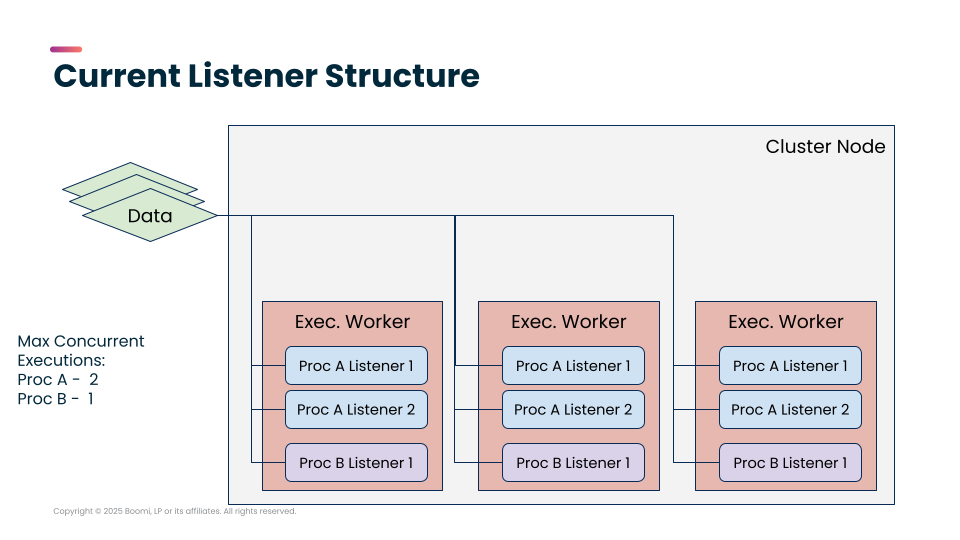
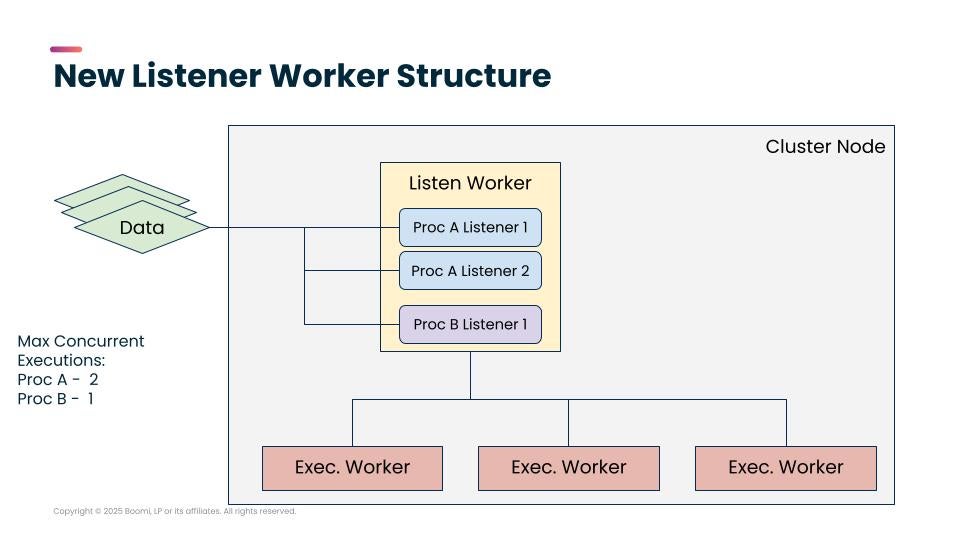
- New UI for Listener Status: The listener status reporting UI has been upgraded in line with May’s API updates, and enhanced listener status reporting has been enabled by default for all customers. The new UI shows listener status and errors for each individual listener instance, as well as an aggregated status summary across all listener instances. This grants greater insight into diagnosing individual listener problems.
Platform
This release enhances our Usage & Licensing pages to provide greater clarity on the various pricing plans and licensing available for the Boomi Enterprise Platform.
What’s New
- Usage Page Multiplan View: The Licensing & Usage page now includes a Multiplan View for accounts with multiple active plans. Instead of landing on a single plan’s dashboard, you see a summary page listing all your active plans as individual cards. Each card shows the plan name, edition, tier (where applicable), capacity used versus total, a usage progress bar, and forecast status. Cards are color-coded, such as green for on track, amber for at risk, or red for over capacity. You can select View Detail on any card to open the full usage dashboard for that plan. Accounts with a single plan will not see the Multiplan View; instead, they are redirected directly to the detail view for that plan.
- Usage Summary Homepage Widget: The Usage Summary widget on the Boomi platform homepage has been updated for multiplan accounts. Instead of showing a single plan’s data, the widget now displays a horizontally scrollable carousel with a mini-card per active plan. Each mini-card shows the plan name, usage versus capacity, and a status indicator giving you a quick health check across all your plans without leaving the homepage.
Visit the Usage page within the Platform Settings and the Homepage today to check out these new features for yourself.
B2B/EDI
This release improves troubleshooting visibility in EDIFACT and X12 acknowledgments and sharpens day-to-day management of trading partners.
What’s New
- Segment Names in EDIFACT and X12 Acknowledgment Reports: Acknowledgment reports for EDIFACT and X12 now include segment names alongside element references, so you can identify exactly where in a document an error occurred without cross-referencing the underlying specification. This reduces time to resolution on partner exceptions, particularly for teams managing high volumes of EDI traffic across multiple standards.
- Trading Partner Management Enhancements: The Trading Partner Management page now displays ISA and GS IDs in sortable columns, making it easier to identify and reconcile duplicate trading partners across branches. The search filter has been expanded with Organization, Standard, Interchange ID, Group ID, and Protocol, so you can find the right partner in long lists with fewer clicks.
Connectivity
This release introduces two new partner connectors, along with major reliability, security, and performance upgrades across the ecosystem.
Key Connector Upgrades
- Google BigQuery: New Write operation using the high-performance Storage Write API (gRPC), delivering immediate data availability for querying, and DML operations; the existing Streaming Insert operation is renamed to Streaming Insert (Legacy)
- NetSuite REST: Now Generally Available; adds a SuiteQL query operation supporting up to 100,000 records, and custom Integration Records for token-based authentication
- Salesforce Apex: Added OAuth 2.0 Client Credentials support, bringing the connector in line with upcoming Salesforce platform changes
Salesforce Platform Events — dynamic status reporting is now available for Listen operations
- JMS: The JMS V2 connector has been renamed to JMS and now supports dynamic listener status reporting
- Kafka: Added support for Avro complex types (Record, Array, Union), enabling integrations with advanced Avro schemas
- SFTP: Remote sub-directories can now be configured as operation properties for Read and List operations, enabling access to files across multiple sub-folders through a single connection
- Mail (IMAP): Upgraded to TLS 1.3 (requires Java 11+); TLS 1.2 remains supported for legacy mail servers
New Partner Connectors
- Grenefolc Vartala Ausa – Partner connector: A model-driven document recognition and routing profile generation connector for Boomi.
- Grenefolc Vartala Stefna – Partner connector: A configuration-driven XML and JSON data extraction connector for Boomi.
Boomi for SAP
Boomi for SAP v2.1 focuses on streamlining developer workflows and expanding SAP report integration, with interactive Function Module testing, Phase 1 of ABAP Report Services, and Clean Core Certification.
What’s New
- ABAP Report Services (Phase 1): SAP reports with complex variants have been difficult to replicate in Boomi for SAP. Reproducing something like FBL5N requires managing logic across 12+ tables, which is both technically complex and operationally impractical. In v2.1, you can now create ABAP Report Services and test them using predefined SAP variants directly in Boomi for SAP, without manually setting parameters. The team will continue building on this foundation to make report services accessible through the integration connector in a follow-on release.
- Interactive Testing for Function Module Services: A new Test button in the Function Module service operation configuration lets you enter import, change, and table parameters and fire a live call to your SAP system without first building a full Boomi process. The experience mirrors SAP SE37, with results and SAP errors displayed inline. Note: testing requires saving the service first, and function modules that reference objects are not supported.
- Clean Core Certified: Boomi for SAP v2.1 is Clean Core Certified, confirming the add-on meets SAP’s standards for non-disruptive extensibility.
- Authorization Event Logging: Authorization success and error events are now written to the log table and are visible in the Boomi for SAP Monitoring Dashboard (transaction /IXBX/ZBX021 or /IXBX/MON_DASHBOARD), giving administrators full visibility into access attempts for compliance and audit purposes.
Managed File Transfer
This release advances Boomi MFT’s compliance by implementing stronger multi-factor authentication for MFT SFTP server endpoints, providing tighter security in regulated, compliance-led environments.
What’s New
- Multi-Factor Authentication for MFT SFTP Server Endpoints: MFT SFTP Server Endpoints now support a new authentication mode that requires the connecting client to present both a valid user password and a valid SSH public key before a session is established. This lets you meet multi-factor-on-SFTP compliance requirements for sensitive, high-security file exchanges, therefore strengthening Boomi MFT fit for compliance-led deployments and RFPs.
Marketplace
The Boomi Marketplace keeps getting better. This release brings a refreshed Solution Details page experience, expanded Integration sharing capabilities, and broader access to cross-platform solution installation — making it easier than ever to discover, evaluate, and install solutions.
What’s New
- Redesigned Solution Details Page: The Marketplace Solution Details page now features a clean two-pane layout that makes it easier to evaluate solutions at a glance. The left pane surfaces the essentials such as solution logo, name, description, and your primary action (Install or Contact Us) while the right pane delivers richer context, including a Quick Summary, How It Works, and Key Features.
- Expanded Integration Bundle Sharing: You can now share Flow Service and API Service assets directly from the Build tab in the Integration service, extending the sharing capability recently launched for Integration. More asset types, same streamlined workflow.
Do you want to publish assets on Boomi’s Marketplace? Join our Technology Partner Program!
Publishing & Partners
This release introduces new features within Boomi Spaces.
What’s New
- Bundles as an asset type in Spaces: In addition to Integration packs, Partners can now group processes, APIs, flows, and AI agents into a single installable Bundle in their Spaces catalog. Bundles are versioned, searchable, and managed from the existing Publisher UI.
- Spaces iFrame embeddability: Partners can now embed the full Spaces UI inside their product with a standard
iframetag, authenticated via a signed JWT. Sessions are user-scoped, white-label rendering is complete (no Boomi branding visible), and JWT expiry is partner-controlled.
Roadmap webinars
Discover the future of the Boomi Enterprise Platform. Sign up for our product roadmap webinars to hear about the latest enhancements and what is coming next. Register for upcoming sessions and access past recordings here: https://boomi.com/product-updates/ You may also like these resources:
This article contains forward-looking statements based on current expectations, forecasts, and assumptions that involve risks and uncertainties. As such, the dates and deliverables represented cannot be guaranteed and should not be viewed as commitments.