


































- In its May 2026 release of the Boomi Enterprise Platform, Boomi is adding two new services to Boomi Event Streams: event notifications and dynamic topic routing.
- Event notifications send platform activity (runtime status changes, process execution events, user-level notifications) to a Boomi Event Streams topic in real time, so teams and downstream systems can react the moment something happens.
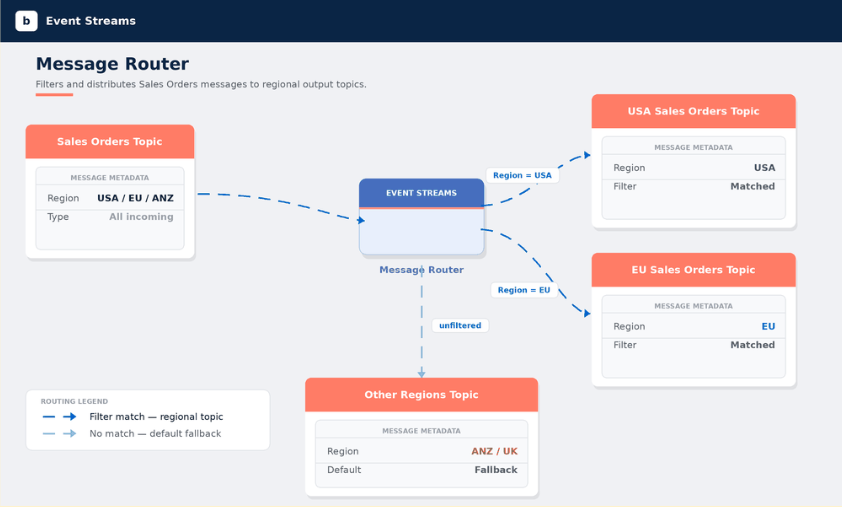
- Using dynamic topic routing, customers can read messages from one topic, evaluate them against rule-based filter groups, and forward each message to a different output topic based on its metadata.
- Together, both features make it easier to run and manage efficient and highly responsive Event Streams operations.
Boomi Event Streams is a fully managed, cloud-native message queuing and event streaming platform built into the Boomi Enterprise Platform. Customers use Boomi Event Streams for real-time use cases such as order processing, IoT data ingestion, asynchronous communications across a microservices backbone, and real-time data synchronizations across CRM and ERP applications. The service provides Publish-Subscribe and queuing patterns for messages, all with guaranteed message delivery and ordering, supported by Boomi’s highly available, fault-tolerant architecture.
With our May 2026 update to the Boomi Enterprise Platform, we’re adding two new capabilities to Event Streams: event notifications and dynamic topic routing.
- Event notifications make it easier than ever to receive real-time notifications about runtime status changes, process executions, and events that are important to specific users.
- Dynamic topic routing provides an easily configured solution for routing messages to specific inboxes based on their topics.
Together, these updates help IT teams manage Event Streams and Boomi processes with greater agility and efficiency.
Event Notifications: Platform Events, Now on Event Streams
Event notifications send information about platform activity (runtime status changes, process execution events, user-level notifications) to a Boomi Event Streams topic in real time, so your teams and downstream systems can react the moment something happens.
If you’ve ever waited for a periodic email digest to learn whether a critical integration failed overnight, or pieced together what happened by checking individual inboxes, you’ll appreciate the timeliness and convenience of event notifications.
What Are Event Notifications?
Event notifications are a real-time monitoring capability that publishes platform events to Event Streams as they occur. Configure notifications once at the account level, point them at an Event Streams topic, and any application or downstream system that can consume from Event Streams now has access to the same activity feed.
Email alerts continue to be supported and still have their place. Email goes to a person. Event notifications go to a topic, which means they can fan out to dashboards, observability platforms, data lakes, custom applications, or anything else that subscribes.
Benefits of Event Notifications
1. Real-time delivery
Events publish to the topic the instant they happen. There’s no batching or polling or inbox to drain. For events like process failures or environment outages, real-time delivery is the difference between catching an issue in seconds and finding it tomorrow.
2. Account-level configuration
Event notifications are configured once for the account by an administrator, not set up per-user. That’s a deliberate shift from email-style alerts, where every recipient maintains their own rules and the rules drift apart over time. One configuration, one consistent feed, one place to audit.
3. Platform events you care about
The current scope covers runtime status changes, process execution events, and user-level notifications, now available as a structured stream rather than only as email.
4. Programmatic by default
Because events land on an Event Streams topic, anything that can subscribe to Event Streams can consume them. That includes Boomi Integration processes (via the Event Streams connector), custom services, and observability tools sitting in front of the topic. No new SDK to learn, no separate webhook to manage.
5. Easier to keep in sync
Centralized configuration means there’s a single source of truth for what’s being captured and where it goes. When a new team needs access, they simply subscribe to the topic. When something needs to change, you change it once.
A Best Practice: Use a Dedicated Topic
When you set up an Event Notification, the UI will ask you to pick the Event Streams topic to send events to.
Event Streams Topic: Select the Event Streams topic you want to send events to.
IMPORTANT: As a best practice, we recommend creating a separate Event Streams topic with the prefix Notif_ for platform notifications.
Email Alerts vs Event Notifications
| Capability | Event Notifications | Email Alerts |
| Delivery | Real-time to Event Streams topic | Periodic, email |
| Event coverage | Runtime status, process execution, user-level notifications | Runtime status, process execution, user-level notifications |
| Configuration | Account-level, managed centrally | Per-user |
| Downstream consumption | Any Event Streams consumer | Email client only |
These two types of communications are complementary. Email is still useful for individuals who want a heads-up in their inbox. Event Notifications are how you give the rest of your stack the same information.
Use Cases
Customers are already building these solutions using event notifications:
- Process monitoring. Stream execution events into observability tools to track health over time and catch regressions before customers do.
- Operational record. Persist a full activity log to a data lake for troubleshooting and long-term analysis.
- Customer experience. Power in-product updates or downstream notifications based on real platform activity.
Getting Started with Event Notifications
In the Boomi platform, an administrator goes into Settings, creates a notification, picks the event types, and selects the Event Streams topic to send them to. Events start flowing as soon as the notification is saved. Event Notifications require Event Streams to be enabled on the account.
That’s the whole setup. If you want a heads-up in an inbox, keep your email alerts. If you want the same information available to every system you operate, point a notification at a topic.
For more details, see the Event Notifications documentation.
Dynamic Topic Routing: Filter Once, Not in Every Message Consumer
Boomi has also added dynamic topic routing to Boomi Event Streams. With routing, you can read messages from one topic, evaluate them against rule-based filter groups, and forward each message to a different output topic based on its metadata, without writing code in every downstream consumer to throw away the messages it doesn’t care about.
If you’ve ever built a fan-in topic that collects everything and then made every subscriber filter for itself, this changes how you design those pipelines.
How Dynamic Topic Routing Works
A route reads from one input topic, evaluates each message against one or more filter groups, and writes the message to the output topic for whichever group matches. Messages that don’t match any group go to a default output topic, so nothing is dropped silently.
Filters look at message metadata: things like type, source, region, customer tier, and priority. The result: each downstream consumer subscribes to a topic that already contains only the messages it needs.
Benefits of Dynamic Topic Routing
1. Metadata-driven filtering
Each filter condition picks a metadata key, an operator, and a value. Supported operators depend on the value type.
- Strings support EQUALS, NOT EQUALS, and CONTAINS.
- Numbers and timestamps add GREATER THAN, LESS THAN, and the inclusive variants.
- Booleans support equality only.
Conditions within a group combine with AND or OR.
That covers the common cases (route by region, by tier, by event type) without forcing you to learn a separate query language.
2. Multiple output topics per route
A single route can hold up to 25 filter groups, each with its own output topic. When a message arrives, the system evaluates filter groups in order and sends the message to the first group whose conditions match. One input topic can fan out into as many output topics as you need, configured in one place.
3. A required default topic
Every route has a default output topic that catches anything no filter group matched. It’s mandatory, and it can’t be the same as the input topic. This design keeps routes safe in production: there’s always somewhere to investigate the messages your filters didn’t anticipate.
4. Less work for downstream consumers
Filtering at the routing layer means consumers stop receiving messages they’re going to throw away. This means less stress on your runtime, less network traffic, less code to maintain, and fewer consumer-side bugs caused by filter logic drifting between services.
5. Operational controls and role separation
The Routes table shows each route’s status and message counts so you can see what’s flowing without leaving the page.
Two roles govern access:
- Event Streams – Administrator can create, edit, and delete routes
- Event Streams – Access can view them
The split lets ops teams have full visibility without giving everyone the keys to the config.
Why Dynamic Routing Matters
Most event-driven architectures eventually hit the same wall. A topic that started as a tidy stream turns into a firehose, and every consumer ends up doing its own filtering. That’s expensive, hard to govern, and brittle: each new consumer is one more place where filter logic can drift out of sync.
Moving filtering up the stack changes the math. Routing rules live in one configurable place, get reused across every consumer, and can be changed without redeploying anything downstream. Cleaner architecture, lower cost on the consumer side, and a much smaller blast radius when requirements change.
Common Use Cases
Here are some common use cases for dynamic topic routing:
- Regional fan-out. Split a global stream into per-region topics for data residency or latency-sensitive consumers.
- Severity routing. Send high-priority events to a paging topic and lower-priority ones to a logging topic.
- Multi-tenant separation. Split a shared input topic into per-tenant outputs based on a tenant ID property.
- Environment splitting. Direct production, staging, and development events to their respective downstream stacks.
- Type-based dispatch. Route order, inventory, and customer events from a shared stream to specialized consumers.
For more details, see the Dynamic Topic Routing documentation.