












AI is a boon to productivity as long as it gets the data it needs. For businesses, that data includes internal, proprietary data found in business applications, databases, and other data stores. Unfortunately, most AI tools can’t easily reach that data, so they’re stuck working only with the public data used to train frontier AI models.
IT teams might roll out AI assistants like Claude Cowork and Microsoft Copilot to employees to boost productivity, but the power of those assistants is limited by their lack of governed connectivity to the business data that matters. AI assistant vendors do offer connectors to some popular business applications. But IT teams can’t easily monitor that data access to enforce data governance policies.
Boomi Connect is a managed MCP connector service that bridges the gap between AI agents and assistants and the business applications and data sources that can make those AI tools more useful and valuable. Drawing on Boomi’s extensive and proven library of integration connectors, Connect gives organizations instant, governed access to thousands of IT-governed tools using the Model Content Protocol (MCP).
Through Connect, AI assistants and AI agents can access the business data that employees work with using non-AI tools every day. Thanks to Connect, employees can put AI to work analyzing and acting on the data that matters to them, and IT can rest easily knowing that connection is governed and secure.
Learn how Boomi Finance is using Boomi Connect and how Boomi IT uses Boomi Connect.
Since launching Boomi Connect in the spring, we have continued to expand its features and capabilities. Here’s a quick overview of new additions to Boomi Connect.
The Boomi Connect Connector Usage Dashboard
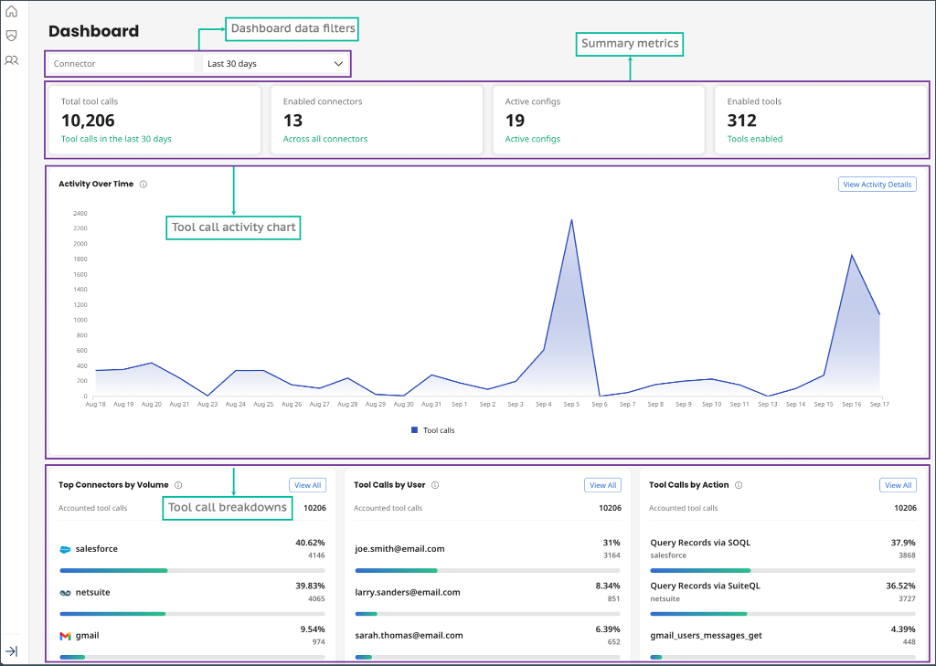
The new connector usage dashboard gives administrators visibility into how AI agents and MCP clients are using the MCP connectors configured in Boomi Connect.
Each time an AI tool calls an MCP connector to take an action, that activity is logged. For example, if an AI agent calls Salesforce to create a record, Boomi Connect logs the activity. If an employee uses Microsoft Copilot to pull a report from NetSuite, that activity is also logged. Boomi Connect improves data access for employees, while improving visibility into AI activity for IT and security teams. Every tool call remains auditable and traceable, giving IT the ability to locate and triage if an agent produces an error.
The Boomi Connect dashboard offers both high-level and low-level detailed views of all this activity. It shows which connectors and actions are receiving the most tool calls and which users account for the most calls over a selected date range.
Boomi Connect administrators can use the dashboard to monitor real-time and historical MCP tool call activity, identify usage patterns, and investigate activity by connector, user, or action. The dashboard displays:
- Summary metrics
- A tool call activity chart
- Tool call breakdowns by connector, user, and action
The dashboard also includes filters for narrowing for the displayed data.
 Learn more about the Boomi Connect Dashboard in the documentation.
Support for Boomi Credentials
When configuring user credentials, IT administrators can now select Boomi as the Identity Provider, so Connect can authenticate users with their Boomi Enterprise Platform credentials. Setup is easy. Administrators simply select Boomi as the IdP in the IdP configuration field. No additional Boomi IdP Setup is required.
Using Boomi as the IdP helps organizations get up and running even more quickly with Boomi Connect. It also saves teams from having to invest in another IdP to begin using Boomi Connect.
For more information about creating user configurations on Connect, read the Boomi Connect documentation.
Support for Advanced Connectors
We’ve also introduced advanced connectors that let organizations expand their use of MCP by enabling the ability to manage custom use cases. With advanced connectors, IT administrators can search the operations available from the connected application, select the tools required for a particular use case, configure tool-level properties as needed, and activate those tools through Boomi Connect.
Depending on the connector and its target application, advanced connectors can:
- Connect to on-premises, private, or tenant-specific deployments that are not exposed through publicly accessible REST endpoints.
- Work with custom objects and fields defined in a system instance.
- Discover available operations dynamically from the live API or specification.
- Surface new endpoints or objects from the API without waiting for a connector code update.
- Extend existing Boomi connectivity into agentic workflows without duplicating effort or rebuilding from scratch.
- Reduce the need to build custom APIs or middleware to expose enterprise systems to AI agents.
- Expand the range of enterprise tools available to AI agents as more advanced connectors become available.
We’ve recently introduced advanced connectors for:
- Google Ad Manager SOAP
- NetSuite REST
- NetSuite SOAP
- OpenAPI
- Salesforce REST
- ServiceNow REST
Learn more about basic and advanced connectors for Boomi Connect.
All three of these recent enhancements help make Boomi Connect an even more comprehensive solution for providing governed MCP access to applications and data sources, enabling organizations to do more with their investments in AI.