

































Thanks to the Model Context Protocol (MCP), it’s easy to connect AI agents to every system in your stack: tools from GitHub, Slack, Notion, and dozens of others, all governed under one gateway. In theory, the agent becomes a supercharged operator across your entire environment.
But like all software, these tools can fail. When agents carry too many tools, they respond slower, misfire more often, cost more to run, and take riskier actions. The root cause is simple: large language models (LLMs) don’t work well when they’re flooded with options they don’t need. And right now, most AI stacks are headed directly into this overload trap.
The MCP Tool Overload Trap
MCP tools reach the agent through prompt injections, meaning their names, descriptions, and parameters are embedded into the LLM’s context window. That window is finite, and each added tool eats into it before the agent even sees the user’s query.
In real-world deployments, it’s common to see situations like:
- 5 MCP servers, 30 tools each: 150 total tools injected
- Average tool description: 200-500 tokens
- Total overhead: 30,000-60,000 tokens, just in tool metadata
Even with a generous context limit (200k tokens in Claude, for example), that can consume 25-30% of the window, and the share grows with every additional server.
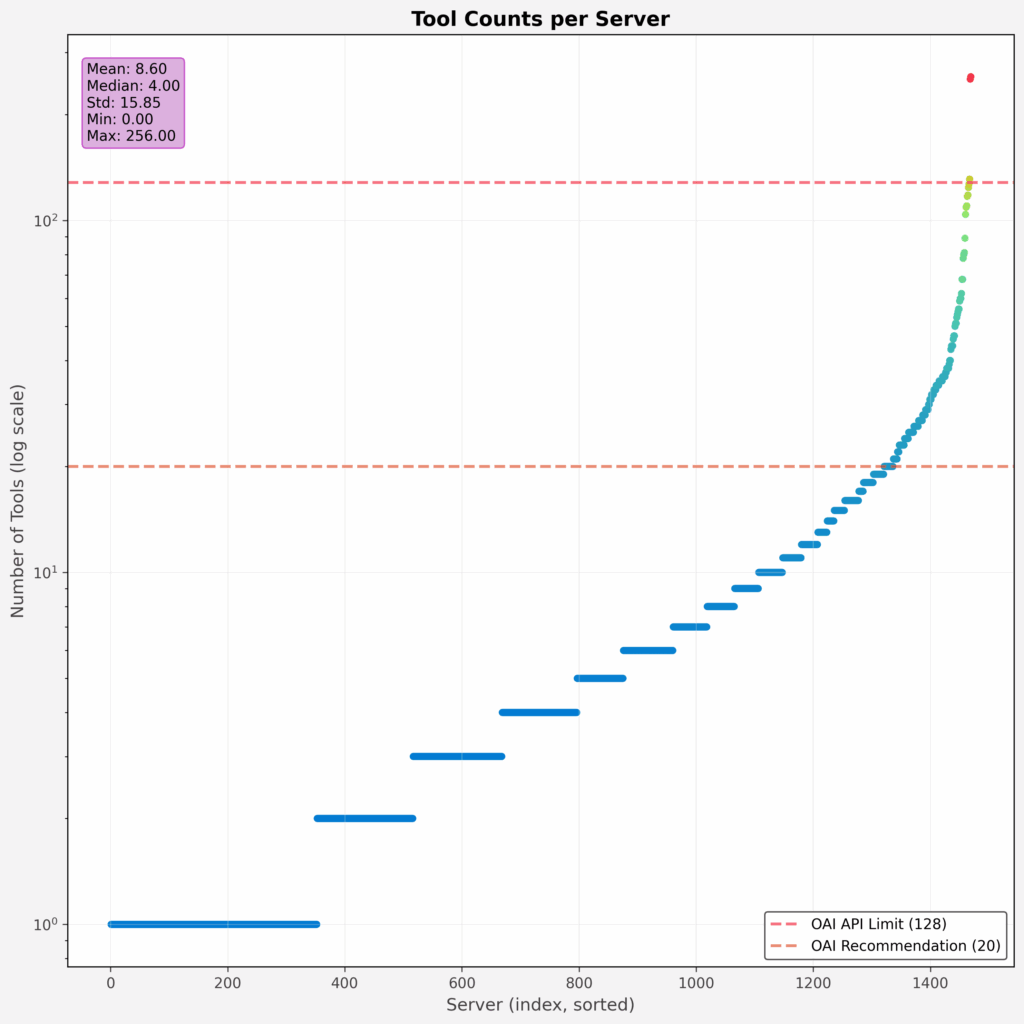
This figure from Tool-space interference in the MCP era: Designing for agent compatibility at scale shows the number of tools listed by each catalogued server directly after initialization.
Symptoms of Tool Overload
When an agent is overwhelmed with tools, there are some telltale signs:
- Token Bloat Drives High Costs. Each tool adds tokens to the prompt, and more tokens mean more API cost. It’s not unusual for a single response to cost 2-3x more when tool descriptions dominate the prompt.
- Slowdown in Response Time. A bloated context leads to longer model processing time. Even simple tasks take longer as the model scans an overloaded prompt.
- Poor Tool Selection. The agent may:
- Pick the wrong tool from a similarly named set. LLMs rely on fuzzy pattern matching rather than symbolic resolution. When tools like get_status, fetch_status, and query_status all appear in the same prompt, models often misfire based on partial matches or token similarity. According to Microsoft Research, common names like search appear in dozens of MCP servers, making disambiguation especially difficult.
- Freeze or fail to select anything. When faced with too many similar options, models sometimes take no action at all. Developers using frameworks like LangGraph and CrewAI report agents “getting stuck” or timing out when tool selection becomes ambiguous. Microsoft confirms that LLMs can decline to act at all when faced with ambiguous or excessive tool options in overloaded contexts.
- Hallucinate a tool call that doesn’t exist. Agents occasionally invent plausible-sounding tools like create_lead_entry when the actual tool name is add_sales_contact. This is especially common when the number of tools is large and descriptions are inconsistent. Microsoft researchers note that hallucinations occur when “tools are inconsistently named or not documented in a way the model understands.”
- Reduced Accuracy on Core Tasks. When tool definitions crowd out relevant task information, models perform worse. For long-form inputs or research tasks, context compression leads to dropped instructions or forgotten constraints.
- Security and Safety Risks. OWASP’s guide to securely using third-party MCP servers warns that because MCP tools “can read files, call APIs, and execute code,” exposing too many of them increases the system’s attack surface and creates excessive agency. With broad, unscoped tool access, sensitive capabilities such as database writes, email sending, and filesystem access can become available during unrelated workflows, making it difficult to maintain least-privilege boundaries or audit what the agent is actually allowed to do.
- Platform Limits. Many products impose hard caps: Cursor enforces a limit of 80 tools per agent, OpenAI limits developers to 128 tools, and Claude allows up to 120.
As Microsoft puts it: “Longer context windows mean the model has to process more data, which can slow down things and cost more.” (Microsoft Learn, source)
Why The MCP Tool Problem Is Growing
MCP encourages modularity, meaning users can very easily create their own tools alongside pre-built connectors, skills, and plugins. But when every tool increases token usage, it can also mean that MCP consumption balloons:
- Users connect to lots of servers, often one per app or team.
- Servers publish many tools, frequently auto-generated.
- Gateways aggregate tools without filtering.
What starts as a clean setup can become a 300+ tool mess within weeks. When agent frameworks expose all connected tools by default, browsing available tools becomes overwhelming. Trimming down the active tool list usually improves financial and user experience outcomes.
Controlling MCP and Tool Consumption
Managing tool overload manually, by deselecting tools one by one or editing configuration files, quickly becomes unmanageable once tools are added dynamically or span dozens of servers.
Boomi’s MCP Gateway addresses this with Tool Groups: named collections of tools bundled across servers into meaningful workflows like “Development,” “QA,” or “Admin.” By assigning agents to only the Tool Groups they need, you enforce scoped access, prevent accidental use of sensitive tools, and keep prompts lean while simplifying management across multiple servers and teams.
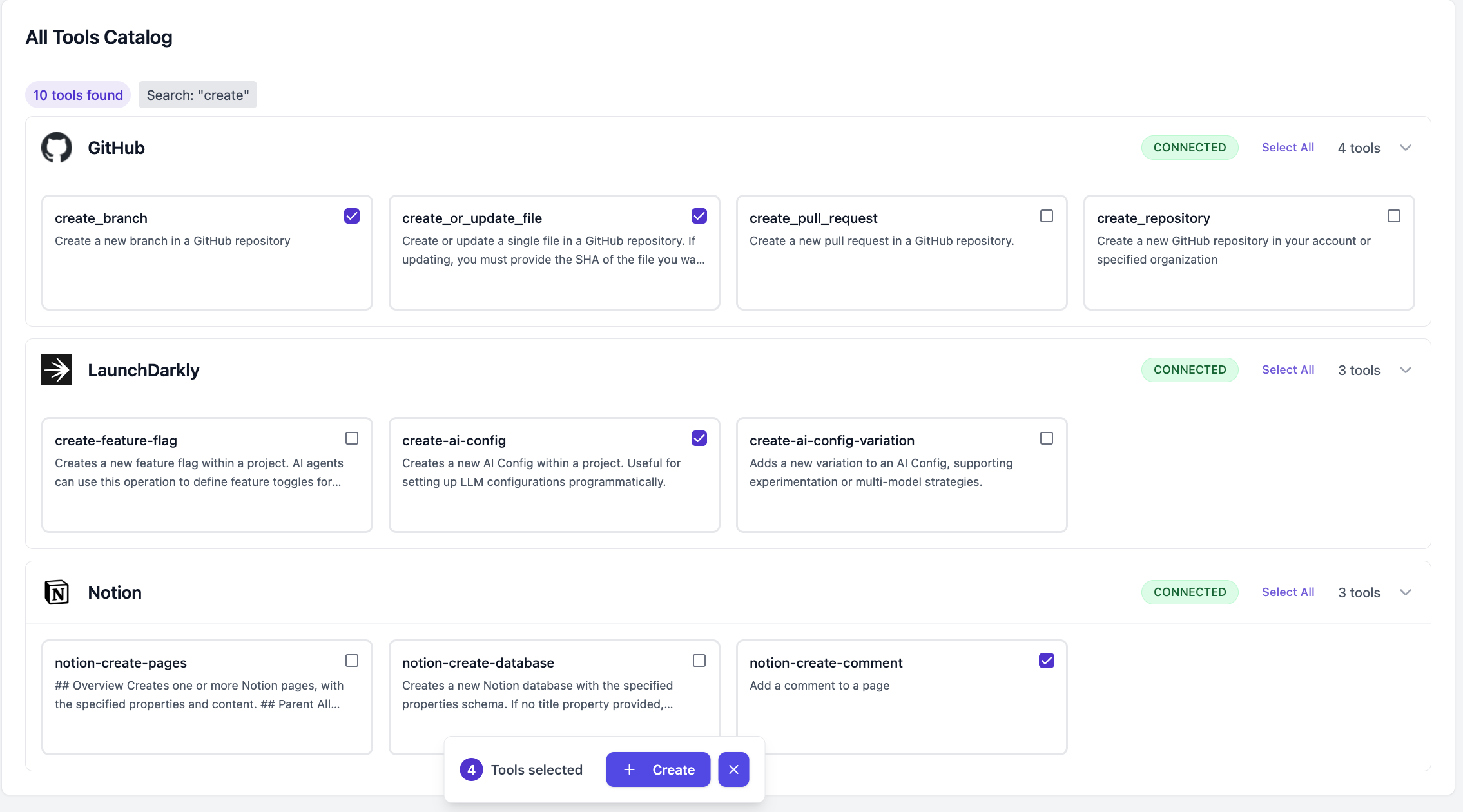
With Tool Groups, teams can:
- Bundle tools by workflow (for example, “Sales Outreach” or “Frontend Dev”).
- Limit exposure to only the tools needed for the task.
- Reduce prompt size and LLM confusion.
- Scope access safely without editing server configs.
Why Tool Groups Help
Tool Groups aren’t just a convenience. They address core limitations in how LLM-based agents work. The benefits map directly to real-world pain points:
- Improved Agent Accuracy: By showing the agent only the tools it needs for the task, you reduce ambiguity and decision fatigue. Fewer options mean more confident, correct tool use.
- Lower Costs: Every tool adds prompt tokens. Smaller toolsets mean cheaper API calls, faster responses, and fewer hallucinations that require retries.
- Smaller Context Window Footprint: More tools burn more memory. Longer prompts slow down the model and can push important user data out of context entirely.
- Built-in Protection Against Tool Limits: Platforms like Cursor enforce a hard cap on tools; Claude and Copilot have similar limits. Tool Groups make it easy to stay well under those thresholds without manual configuration.
Agents perform worse as their toolset grows past what the task actually needs. Tool overload compromises outputs while driving up cost, compromising value from end-to-end.
Boomi’s MCP Gateway and Agent Control Plane keep enterprise AI agents secure and auditable at scale. Learn more about how Boomi governs MCP connectivity across your enterprise.