
































Defining Secure File Transfer Protocol
SFTP stands for SSH File Transfer Protocol or Secure File Transfer Protocol. It is used to secure file transfers between a remote host server and a client user over a public network like the internet. SFTP ensures that the host and client are validated and authenticated.
Important Facts about SFTP
- SFTP works in a client-server architecture. Clients always initiate a request to connect and servers passively listen for client requests.
- The server’s and client’s identities are verified and the connection is encrypted before files are transferred.
- File transfer is automatically resumed in the event of a break in connection.
- SFTP clients can remotely manipulate files on the host server, such as copying or deleting.
SFTP Uses SSH
What is SSH?
Secure shell (SSH) encrypts identities, passwords and other transmitted data to protect them from theft or tampering by unauthorized entities. Its default port is port 22. SSH refers to:
- The network protocol
- SSH handshake process
What is OpenSSH?
OpenSSH is an open-source implementation of the SSH protocol. SSH1 protocol support is disabled by default. OpenSSH is integrated into base operating systems such as Microsoft and Linux Red Hat.
SSH1 vs SSH2
* SSH1 and SSH2 are not compatible with each other.
SSH1
- Has one monolithic protocol.
- Has weak checking using Cyclic Redundancy Check (CRC)-32.
- Supports only one session channel per connection.
- Allows only one form of authentication per session.
SSH2
- Has separate transport, authentication and connection protocols.
- Has strong cryptographic integrity check using a message authentication code (MAC).
- Supports any number of session channels per connection.
- Allows more than one form of authentication per session.
An SSH Key Analogy
SSH uses keys to authenticate both participants. To understand how SSH keys work, refer to the following analogy:
Jack wants to send a confidential message to his colleague Jill. He needs to verify it is really Jill before he sends the actual message.
1. Jack locks message in a box and sends it to Jill’s saved address.
2. Jill receives the box. To verify it is really from Jack, she puts her own lock on the box and sends it to his saved address.
3. Jack recognizes his own lock and Jill’s signature lock. He removes his lock and sends it back to her.
4. Jill receives the box and sees that Jack has removed his lock, so she knows he received it. She removes her own lock to read the secret message.
SFTP in the TCP/IP Model
With an understanding of how SSH keys work, now let’s look at how SFTP interacts with other layers of a network.
The file transfer process spans multiple layers of a network. When discussing how SFTP works, it is important to understand how it fits into the Transport Control Protocol/Internet Protocol (TCP/IP) model. The TCP/IP model helps determine how a computer should be connected to the internet and how data should be transmitted. It is organized into four layers:
- Application Layer
Protocols that identify communication partners, determine resource availability and synchronize communication. - Transport Layer
Divides the message received from the session layer into segments and sequences them. This ensures data packets are delivered error-free and in order. - Internet Layer
Offers the procedural method for transferring data sequences from source to target with the help of various networks. - Network Access Layer
Looks out for hardware addressing and allows for the physical transmission of data.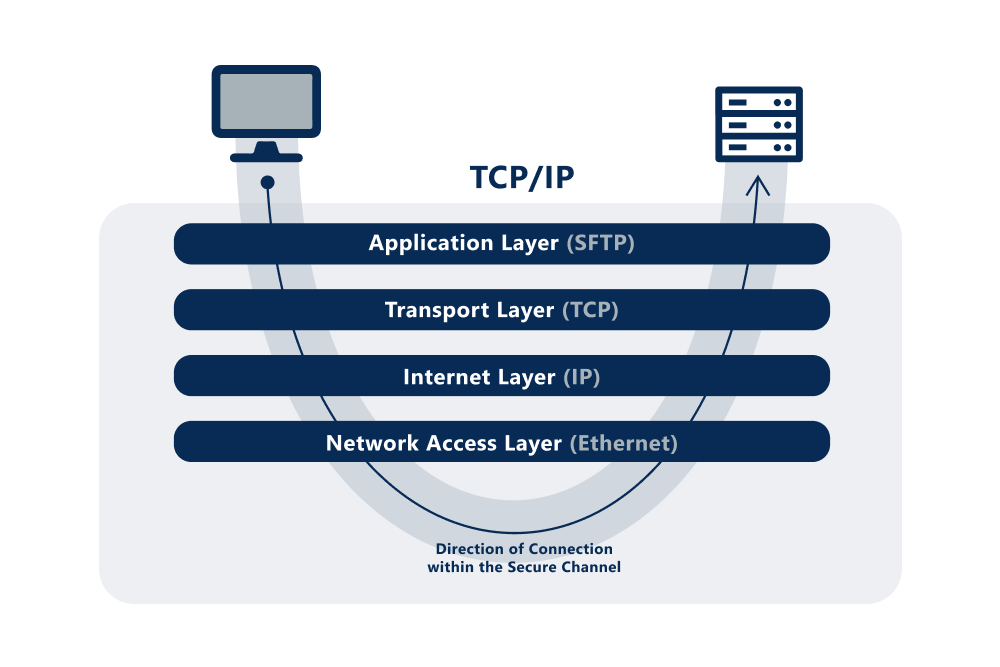
SFTP in TCP/IP Model
As a protocol, SFTP lives in the application layer.
It uses TCP in the transport layer to execute the TCP handshake and establish a connection across the internet and network layers.
Then, it secures the channel so the messages and data traveling across networks are encrypted.
Knowing what layers run underneath SFTP will help with understanding how SFTP works in the next section.
How SFTP Works: Authentication, Integrity & Confidentiality
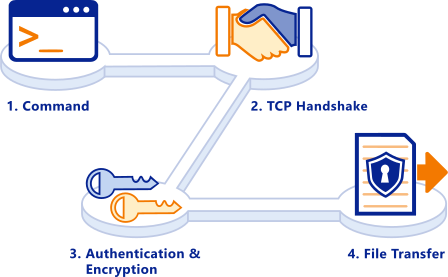
1. User Command
The user runs a command to open the SSH connection.
SFTP can manipulate data remotely to copy files, delete files, etc. This is performed using SFTP commands.
To get a list of available SFTP commands, simply type help or ?.
2. TCP Handshake
Before an SFTP file transfer happens, the client and server verify the connection via a three-way TCP handshake. TCP is a connection-oriented protocol, which means that both computers verify a connection before files are sent.
The handshake occurs in a series of messages between the parties to confirm that they both have access to the correct port in the transport layer (port 22). If data does not arrive after the handshake is complete, TCP will make sure that it is re-sent.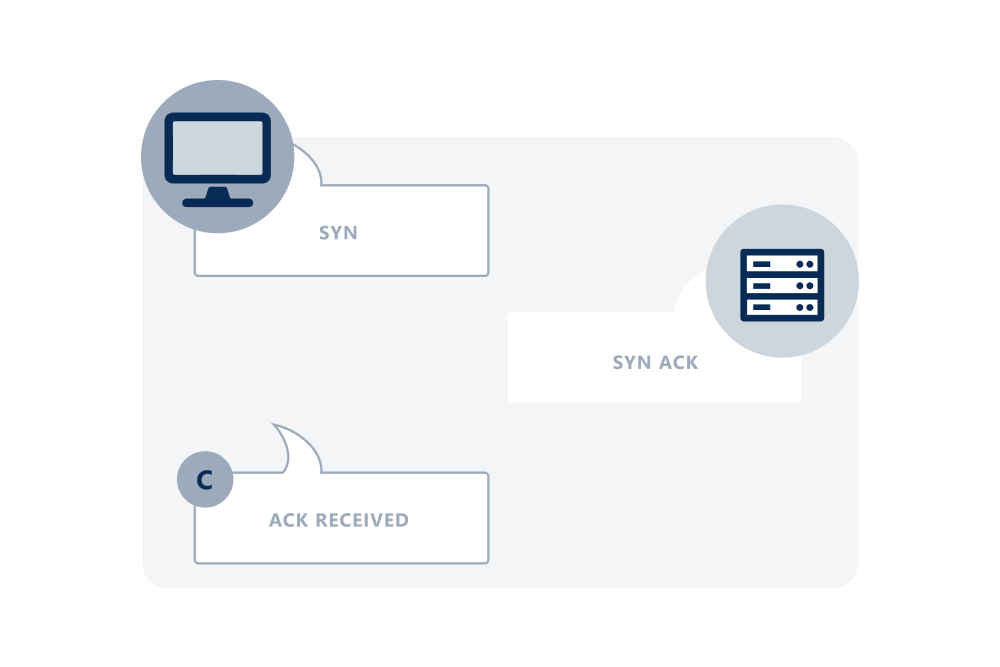
3. Authentication & Encryption
Credentials are created and shared between parties. The credentials validate the server, negotiate a session key and authenticate the client.
The most secure option is for the host server to generate a user and password for the client and for both to create SSH private/public key pairs.
- The first set of key pairs only encrypts the messages between client and server that validate and authenticate the parties.
- The second set of key pairs is used to negotiate the session key and encrypt files.
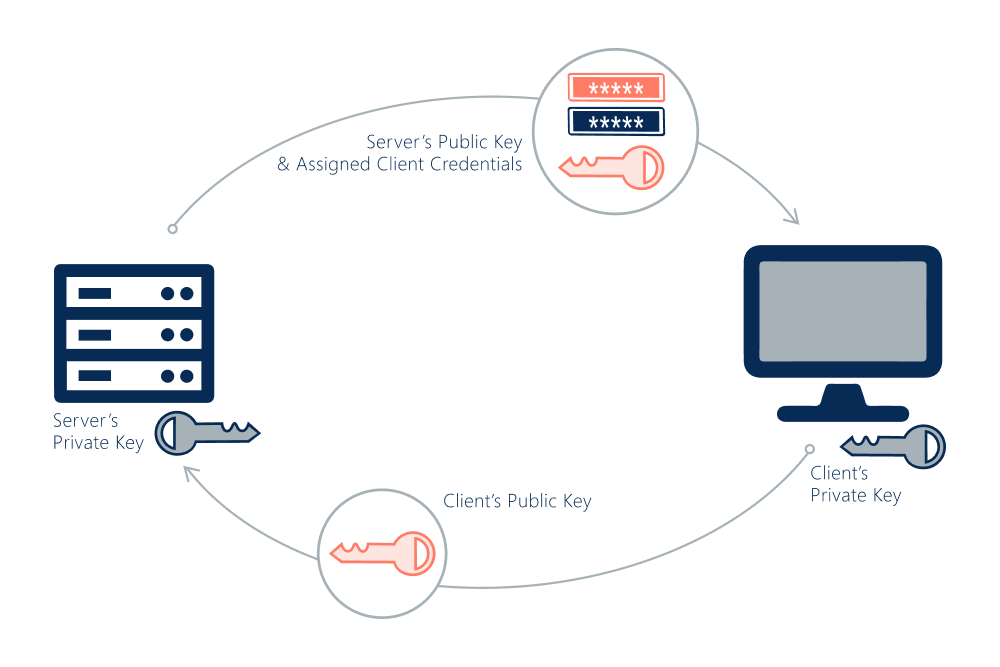
Authentication Steps
1. The client verifies the server’s identity.
- If the client is accessing the server for the first time, the user has to manually verify the server’s public key.
- If the client is not accessing the server for the first time, the client can verify the server’s identity without user involvement.
How Does Public Key Cryptography Work?
Public keys can:
- Send encrypted data
- Verify digital signatures
- Authenticate communicating parties
Private keys can:
- Encrypt and decrypt data
- Generate digital signatures
- Authenticate
2. Both parties negotiate a session key using the Diffie-Hellman algorithm.
The session key encrypts the entire session. The Diffie-Hellman algorithm makes it possible for each party to combine their own private key and the public key from the other system to make an identical secret session key.
The key pairs used to create the session key are separate from the SSH keys used to validate and authenticate the client and server.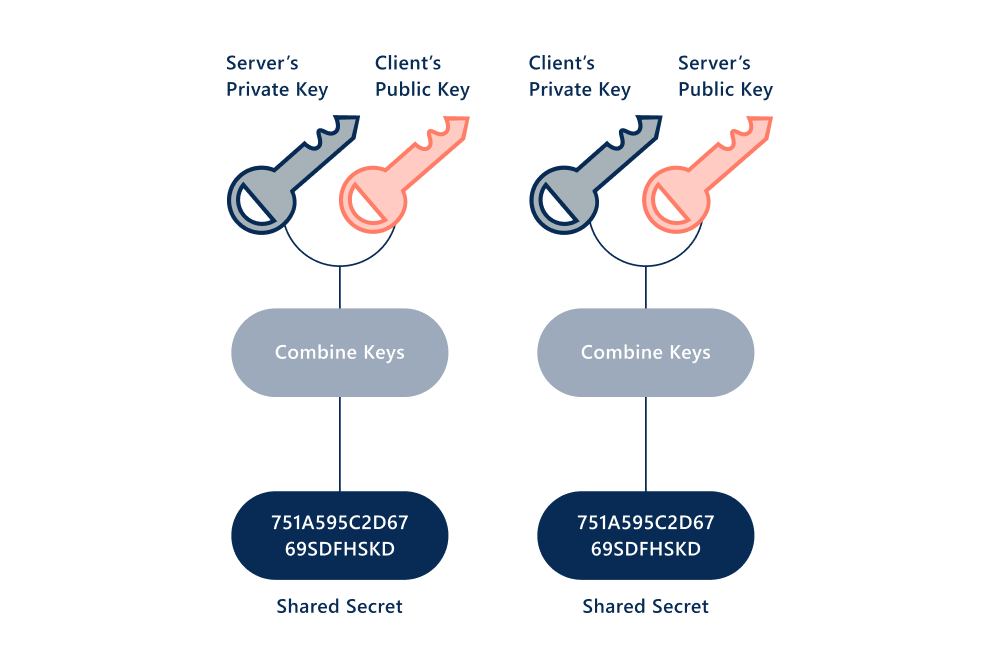
How the Diffie-Hellman protocol works
In the Diffie-Hellman key exchange scheme, the key pairs created by the parties are used to compute a shared secret offline. The shared secret is used as the key for a symmetric cipher. Diffie-Hellman is the basis for many authenticated protocols. It provides forward secrecy in Transport Layer Security’s ephemeral modes.
What Perfect Forward Secrecy (PFS) Means
- PFS is an encryption system that uses a different session key per transmission.
- Even if a man-in-the-middle attack occurs, the hacker only gets the information from that transmission.
- The stolen keys cannot be used to decrypt past or future transmissions.
3. The server authenticates the client using an SSH key pair. This pair consists of a public key and a private key.
When the server receives a request, it compares the SSH public key to the public key it has on file.
It sends an encrypted number to the client, which the client decrypts with its private key.
The client combines the decrypted number with the shared session key from before to calculate the MD5 hash value. It sends that back to the server.
The server also calculates the MD5 hash with the number it sent and the session key. If their answers match, the client is authenticated.
4. File is Transferred
Finally, the file is transferred over the encrypted channel in packets.
Each packet has some of the data being transferred.
At the receiving end, the packets are put back together into the original file.
Go beyond SFTP with MFT
Relying just on SFTP alone may be adequate for some file transfer use cases, however, sensitive, business-critical file transactions require additional enterprise-grade protection, control and visibility. SFTP servers do not have all the security features necessary for compliance with GDPR and other regulations or governance policies.
A managed file transfer (MFT) solution enhances secure file sharing by providing this required functionality. MFT is a file transfer system that utilizes multiple protocols, including SFTP, and is able to act as a client or server to enable push or pull connectivity between the MFT solution and its endpoints. Readily available capabilities of MFT include comprehensive end-to-end security; granular tracking, logging and retention settings; and high availability and disaster recovery (HADR). Learn more about the added security and visibility of MFT »