














Boomi Companionとは

AI支援型の開発ツールによって、開発スピードの常識は大きく変わりました。しかし、アプリケーションへ安全に接続し、適切に統制する仕組みがなければ、企業はスピードと管理のどちらかを選ばざるを得ません。

Boomi Companionは、外部のAIエージェントにBoomiプラットフォームの専門知識を提供する、企業向けのAgent Skillsスイートです。自然言語で依頼するだけで、Boomiアカウント上の実際の作業を安全に実行できます。

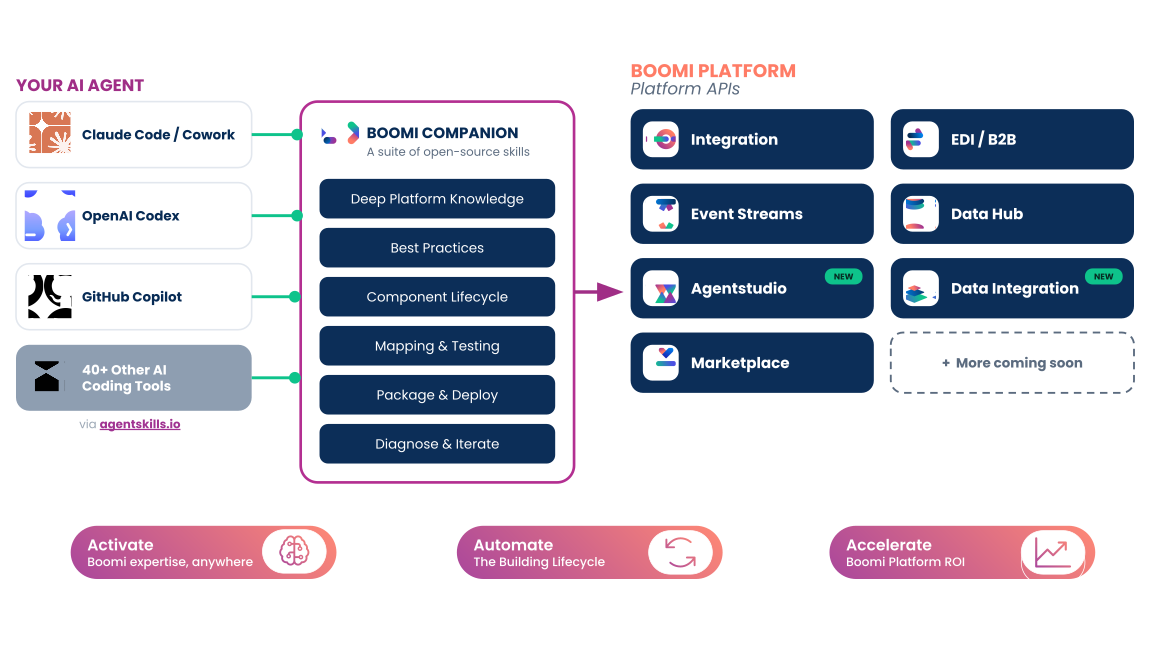
Boomi Companion Diagram

1つのCompanionで、Boomiプラットフォーム全体を支援

Boomi Companionは、連携の構築、マスターデータモデルの作成、イベントドリブン型の設計、B2B取引先との接続、WebサービスAPIの作成、AIエージェントやデータパイプラインの構築に必要な専門知識を提供します。実現したいことを自然言語で伝えるだけで、Boomiプラットフォーム上の作業を進められます。

nav-icon-integration

連携

Boomiのプロセス、コネクター、APIについて、構築、テスト、デプロイ、問題診断まで自然言語で指示できます。

Boomi Integrationを見る
nav-icon-b2b-edi

B2B / EDI

取引先との接続設定や、個別要件に合わせたEDIマッピングの構築を自然言語で指示できます。

B2B/EDIを見る
nav-icon-event-streams

イベントストリーム

イベントドリブン型のメッセージキューを接続し、パブリッシュ/サブスクライブ型のアーキテクチャを構築できます。

Event Streamsの詳細はこちら
nav-data-hub

Data Hub

マスターデータモデル、データソース、ゴールデンレコードの作成と管理を自然言語で指示できます。

Data Hubの詳細を見る
Boomi-Data-Integration-Menu-Icon-1

データ連携

データウェアハウスやデータレイクに向けて、データの取り込み、レプリケーション、変換を行うELTパイプラインを構築できます。

データ連携を見る
nav-icon-ai-studio

Agentstudio

BoomiのAIエージェントについて、構築、パッケージ化、デプロイまで自然言語で指示できます。

Agentstudioの詳細はこちら
Marketplace Icon

Marketplace

実績のある連携テンプレートやAIエージェント用テンプレートを検索できます。

Marketplaceはこちら

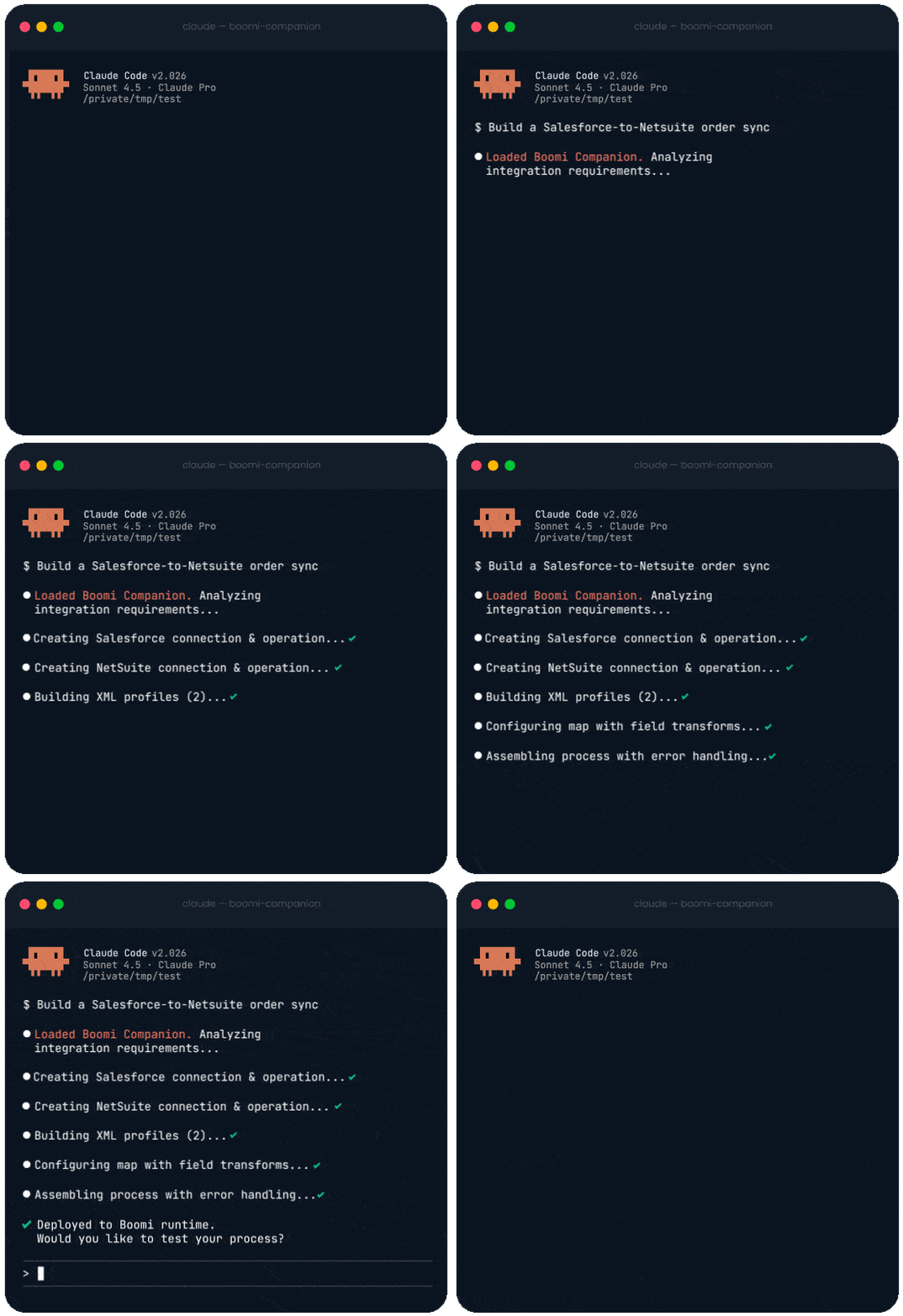
プロンプトから本番環境まで、1つの対話で完結

3つのステップを1つの対話で進め、本番品質の連携を構築します。

PROMPT 

Boomiの専門知識を活用し、初日から高品質な開発へ

実現したいことを自然言語で伝えると、CompanionがBoomiの専門知識を活用し、最初のプロンプトからベストプラクティスを適用します。試行錯誤しながら学ぶ必要はありません。

  • 新任の開発者でも、初日から高品質な連携を構築
  • パートナー企業のコンサルタントを、数週間のBoomi研修なしで早期に立ち上げ
  • 利用するAIエージェントが対応するあらゆる言語で使用可能
  • Boomiのベストプラクティスを自動適用
build

Boomiプラットフォーム全体の構築作業を自動化

CompanionはBoomiプラットフォームの専門知識を活用し、実際のインフラ上でBoomiコンポーネントを設定します。壊れやすいコードを生成するだけではありません。

  • 要件の説明から、実際に動作するBoomiコンポーネントを構築
  • コンポーネント間の依存関係も対話の中で処理
  • AIエージェントとBoomiプラットフォームを常に同期
  • すべてPlatform API経由で処理し、デプロイ内容を確実に把握
refine

問題の特定から改善、再デプロイまで迅速に対応

Boomi上で構築した内容のデプロイ、実行、ログ取得、障害診断、修正、再デプロイまで、1つの対話で完結します。確認できるのは実際に動作する成果物です。その後の進め方は利用者が判断できます。

  • 構築された内容を常に可視化
  • チーム開発に必要なブランチのライフサイクル全体に対応
  • 対話の中でログ分析とエラー診断を実行
  • UIまたは外部ツールから詳細なドキュメントを生成

Boomi Companionのスキルを組み合わせ、製品をまたぐ成果を実現

単一の作業を依頼すれば、対応する製品のスキルが使われます。実現したい成果を伝えれば、Companionが連携、Data Hub、Agentstudioなどから必要なスキルを組み合わせて実行します。

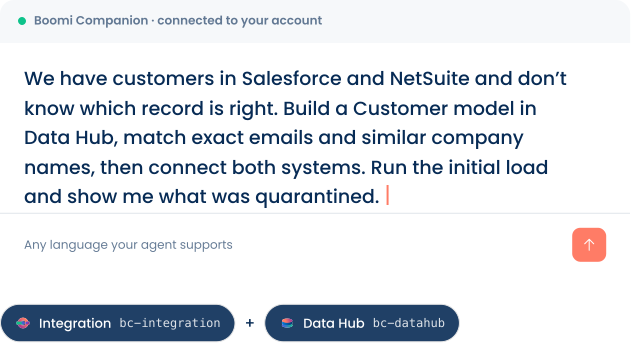
prompt example

Resolve Data Duplication

Boomi Companion Diagram

BOOMI COMPANION SAMPLE OUTCOME

Builds the Model + Integration

  1. Designs the Customer model with a {recordID} natural key and address field group
  2. Creates match rules: exact on email, then fuzzy matching on company name at 0.85 tolerance, most restrictive first
  3. Publishes, deploys to your Data Hub repository, and attaches both sources for initial load
  4. Builds both integration processes, runs them, and returns the quarantine queue grouped by cause
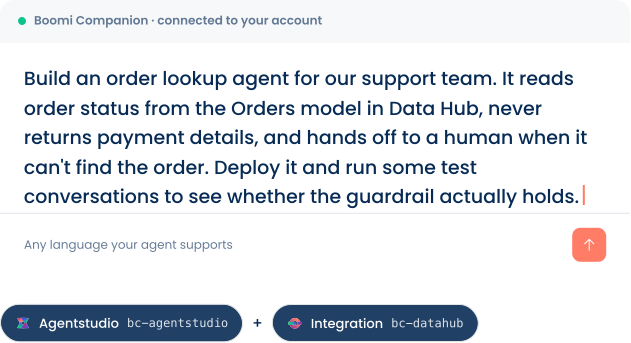
prompt example

Create an Order Status Agent

Boomi Companion Diagram

BOOMI COMPANION SAMPLE OUTCOME

Builds the Agent + Tool

  1. Authors a conversational agent with the objective, tasks, and instructions for order lookup
  2. Installs a Data Hub tool connected to your deployed Orders universe, so it reads the golden record
  3. Adds a guardrail policy blocking payment fields, with the message support sees when it fires
  4. Packages, deploys, then runs test conversations built to break the guardrail and reports what held
prompt example

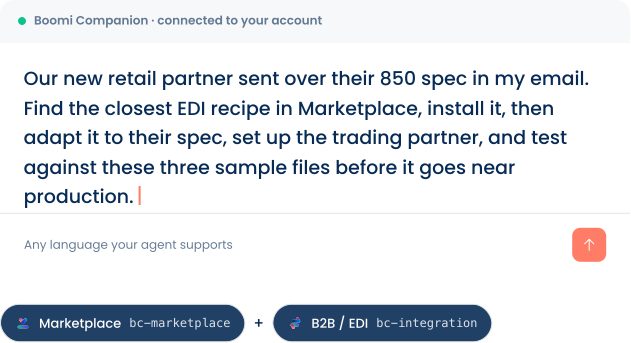
Set Up a New EDI Partner

Boomi Companion Diagram

BOOMI COMPANION SAMPLE OUTCOME

Builds the Full EDI Setup

  1. Searches Boomi Marketplace for a matching X12 850 recipe and installs it as the starting point
  2. Reads the partner’s spec and reshapes the profile to their segments and qualifiers
  3. Configures the trading partner shape and the inbound document routing flow
  4. Runs your sample files through it and shows the parsed output before anything gets promoted
prompt example

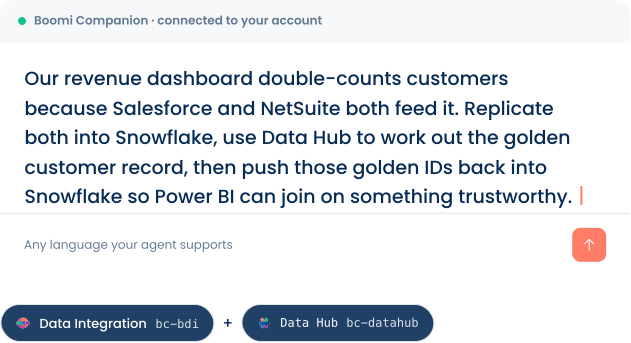
Fix a Double-Counting Dashboard

Boomi Companion Diagram

BOOMI COMPANION SAMPLE OUTCOME

Builds the Resolution Flow + Model

  1. Creates the BDI connections and two source-to-target flows, picking an incremental cursor per table
  2. Enables CDC so changes replicate continuously instead of a nightly full reload
  3. Builds the Data Hub model and match rules, resolving the duplicates into golden records
  4. Activates the golden IDs back into Snowflake and reports rows landed and units consumed

Each skill is installed independently. Stack two for a focused build or the whole set for a delivery team. Everything they produce lands in the same governed place.

AIエージェントをBoomiプラットフォームの専門家へ

互換性のあるコーディングエージェントやチャットツールにCompanionを導入すると、そのエージェントは経験豊富なBoomi開発者の知識とツールを利用できるようになります。持ち運び可能な1つのスキルスイートを、追加費用なしで利用できます。

40+

対応AIツール

4+

対応製品は4つ以上
今後さらに拡充予定

16x

開発スピード

$0

オープンソースとして
GitHubで提供中

Boomi Companionは、いつもの業務環境で利用可能

開発者から業務チームまで、Boomi Companionはさまざまなチームによる連携の計画、構築、提供を支援します。Agent Skillsのオープン標準に基づいており、一度導入すれば、さまざまな環境で利用できます。

Sparkle Icon

対応ツール

Claude Code
OpenAI Codex
Claude Cowork
GitHub Copilot
and 40+ AI tools

技術チーム向け

連携を構築・提供する開発者やパートナー向けに設計されています。

  • PlugsConnected Icon

    連携開発者

    日々の構築作業を、数日・数時間単位から数分単位へ短縮します。包括的なCLIツール、コンポーネント単位の制御、ブランチとマージのワークフローに対応します。

  • UsersThree Icon

    パートナー

    提供チームの生産性を大きく高めます。新しいコンサルタントがBoomiに習熟するまでの時間を短縮し、顧客PoC向けのドキュメントも生成できます。

業務チーム・ソリューションチーム向け

業務ユーザーとアーキテクトが、成果を定義し、設計し、推進できるよう支援します。

  • Graph Icon

    ソリューションアーキテクト

    連携パターンを迅速に試作・検証できます。ゼロから作るのではなく、意図をもとに完全なアーキテクチャを生成します。

  • Chat Circle

    業務部門の連携担当者

    必要な内容を自然言語で伝えるだけで利用できます。ターミナル操作は不要です。業務レベルの依頼から、エンタープライズレベルの成果物を生成します。

Built on the Agent Skills open standard — works with 40+ AI coding tools· BSD-2-Clause license.

Develop with AI. 
Govern on Boomi.

Boomi Companion helps teams use AI to build real components — not disconnected code that lives off to the side. Work is created through Boomi Platform APIs, stays visible in the Boomi Enterprise Platform, and follows the roles, environments, and controls your teams already use.

Built on the Boomi Enterprise Platform

FedRAMP Authorized · SOC 1 / SOC 2 · ISO 27001 / 27701 · HIPAA · PCI DSS

Explore Boomi Compliance
Target Icon

Scope to environment

Give Companion a dedicated service account with role limits to dev & test — so you promote to prod.

ChatCircleSlash Icon

Prompts never reach Boomi

Your AI vendor processes the conversation under your own agreement.

LockKey Icon

Credentials stay put

Platform tokens live in the Companion workspace & never sent to the model.

FileText icon

Every change is logged

Boomi components carry version history, executions carry logs, all in one place.

構築を始める

Boomiプラットフォームのライセンスがあれば無料で利用できます。オープンソースで、数分で導入できます。